GOOGLE MEET TRANSCRIPTION
Google Meet transcription
Turn your Google Meet conversations into searchable bilingual transcripts. MeeLang keeps the original words and their translation together, so you can follow the call and revisit the details later.
Free minutes to start · No meeting bot · No credit card required
THE QUICK ANSWER
Can you get a transcript of a Google Meet?
Yes. Google Meet transcription converts spoken conversation into a written record you can review after a meeting. You can use Google's built-in transcription on an eligible account, or use MeeLang's Chrome extension to keep a bilingual transcript with the original speech and translated text together.
For multilingual meetings, a transcript is more useful when you can read it in your own language. MeeLang combines live translated subtitles with saved meeting records, helping you understand the discussion as it happens and find important details afterwards.
GOOGLE MEET TRANSCRIPTION WITH MEELANG
One conversation. A record in two languages.
Keep the wording people used alongside the translation you relied on during the call.
Original text + translation
Review both languages in the same meeting record. Check the original phrasing when a translated answer, technical term or follow-up needs a closer look.
Search and filter your meetings
Find a past discussion without reading every transcript. Browse your meeting history, search its contents and filter records to narrow down the conversation you need.
Speaker-separated transcripts
MeeLang identifies different speakers and keeps their speech separated in the transcript, making exchanges easier to follow when you revisit a meeting.
Export your bilingual record
Export meeting records with original text and translation together. Keep a copy for project notes, interview review or a handover to a colleague.
AI meeting summaries
Use an AI summary to review the main points, decisions and action items, then return to the transcript when you need the surrounding discussion.
Meeting history on your device
Your transcripts stay locally in your browser, where you can review or delete them. Meeting content is processed for transcription and translation; local storage does not mean offline processing. Read our privacy policy.
HOW IT WORKS
How to transcribe Google Meet with MeeLang
Install the extension before your call and start MeeLang when you join. Your meeting records build from the conversation captured while it is running.
Need help with browser permissions? Follow the MeeLang setup guide.
Install MeeLang for Chrome
Add MeeLang from the Chrome Web Store and open your Google Meet call in Chrome.
Choose your translation language
Enable MeeLang for the meeting and allow the requested audio access. Choose the language you want to read; translated subtitles appear as people speak.
Review your meeting transcript
Open your meeting records in MeeLang to revisit the original text and its translation, organized by conversation.
Search, summarize or export
Find the details you need, generate an AI summary or export your bilingual record for use after the call.
BILINGUAL TRANSCRIPT EXAMPLE
Keep the words. Keep the meaning.
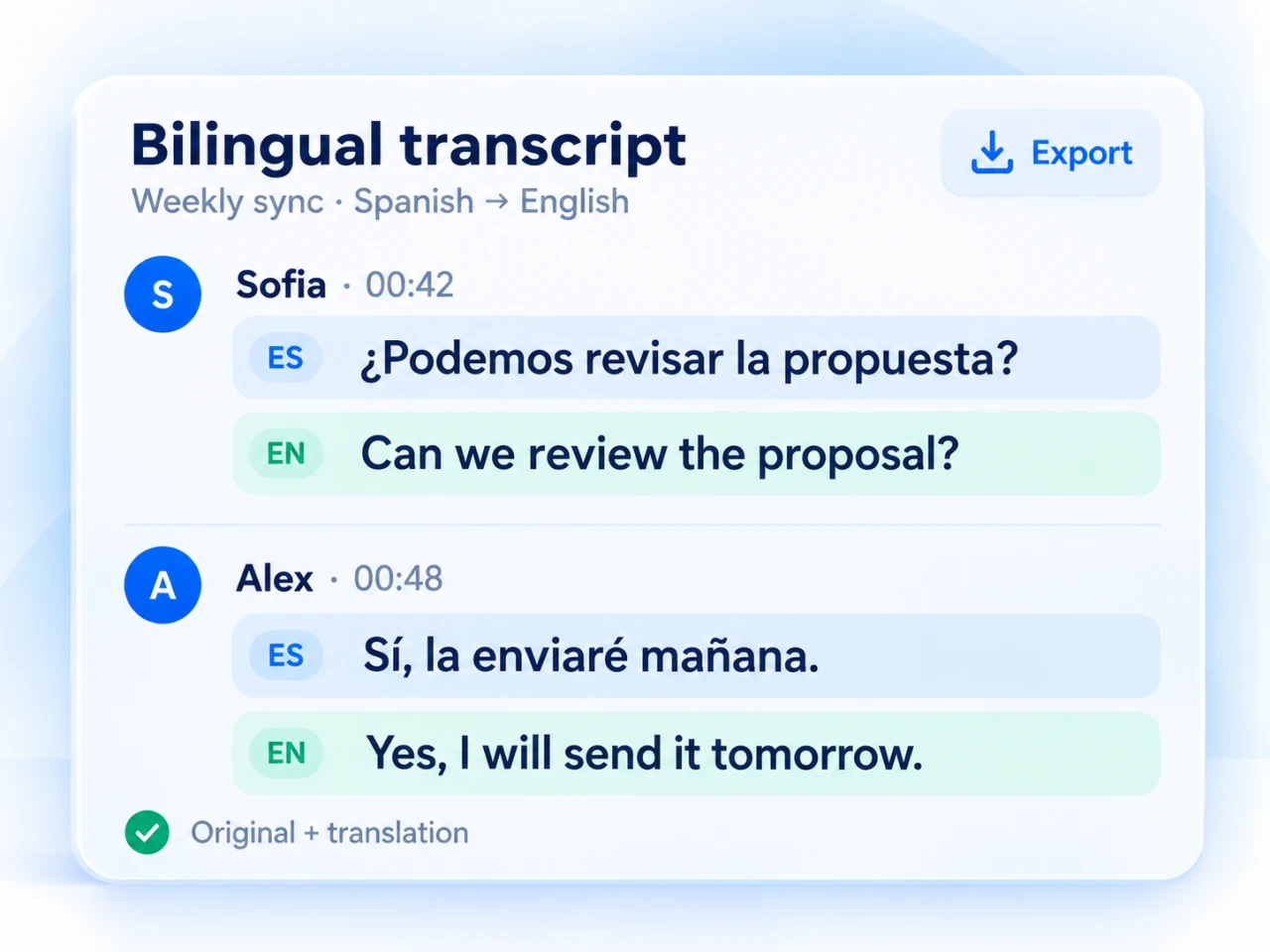
A Spanish client call can leave you with both the Spanish conversation and an English translation to review. The same workflow helps with international team meetings, interviews and online classes.
MeeLang supports translation into 30+ languages. Explore Google Meet translation options.
¿Podemos revisar la propuesta antes del viernes?
Can we review the proposal before Friday?
Sí, enviaré la versión actualizada mañana.
Yes, I'll send the updated version tomorrow.
COMPARE YOUR OPTIONS
Google Meet transcription or MeeLang?
Choose based on the record you need and the account you use. Google's native feature suits a transcript in your organization's Drive. MeeLang adds translation and a personal library of bilingual meeting records.
| What you need | Google Meet built-in transcription | MeeLang |
|---|---|---|
| Access | Eligible Google account and organization settings | Chrome extension; no eligible Workspace transcription plan required |
| Bilingual record | Transcription and translation are separate features | Original text and translated text together |
| Where you review it | Organizer's Google Drive | Meeting records in your own browser |
| After the call | Open the saved transcript document | Search, filter, summarize, export or delete records |
| Extra participant | No transcription bot | No meeting bot joins the call |
Google's availability and controls can change. See Google's official transcription documentation for current requirements.
USING GOOGLE'S BUILT-IN OPTION
How to turn on transcription in Google Meet
On a computer, open Meeting tools → Transcribe → Start transcription, then confirm. Participants see a transcription indicator while it runs.
If the control is missing, check your account's eligibility, administrator settings and host permissions using Google's setup instructions.
Where are Google Meet transcripts saved?
Google saves native transcripts in the organizer's Drive, under the Google Meet folder. Access also depends on sharing permissions; if you attended someone else's meeting, ask the organizer for the file.
Where are MeeLang transcripts?
Open MeeLang's meeting records in the same browser profile you used for the call. Your bilingual records are stored locally, so export important transcripts before clearing extension data or switching devices.
COMMON QUESTIONS
Google Meet transcription FAQ
Is Google Meet transcription free?
Google's native transcription requires an eligible account. MeeLang offers free minutes to try its live translation and bilingual meeting records, with paid plans for more usage. Check the current allowances on our pricing page.
Can I get a bilingual Google Meet transcript?
Yes. MeeLang keeps the original text and its translation together in your meeting records. You can review, search and export the bilingual transcript after the call.
What is the difference between captions and a transcript?
Captions display speech as text during a call. A transcript is a saved record you can revisit afterwards. MeeLang provides live translated subtitles during the meeting and bilingual records for later review.
Can I transcribe Google Meet with a personal account?
MeeLang works in Chrome without requiring the meeting organizer to have an eligible Workspace transcription plan. Install the extension and enable it for your meeting to create bilingual records.
Does a bot join the meeting?
No. MeeLang runs in your browser and does not add a recorder participant to the meeting. Follow your organization's meeting policies and let participants know when you are saving a transcript.
Can I recover a transcript after a meeting ends?
You can reopen a record that MeeLang captured while it was enabled. Installing or starting MeeLang after a call cannot recover speech it did not capture. If native transcription was used, ask the organizer for the Google Drive transcript.
Can I download or export my Google Meet transcript?
Yes. MeeLang lets you export meeting records with the original text and translation together. Open the meeting in your MeeLang records and use the export option.
How accurate is an AI meeting transcript?
Accuracy depends on audio quality, background noise, overlapping speech and specialist vocabulary. Review names, numbers and important decisions before relying on a transcript or summary. Keeping the original text alongside the translation makes that review easier.
Make your next meeting easier to revisit
Get Google Meet transcription with both languages in one place. Follow the conversation live, then search and export the details with MeeLang.
Add MeeLang to Chrome